Hide all Shorts
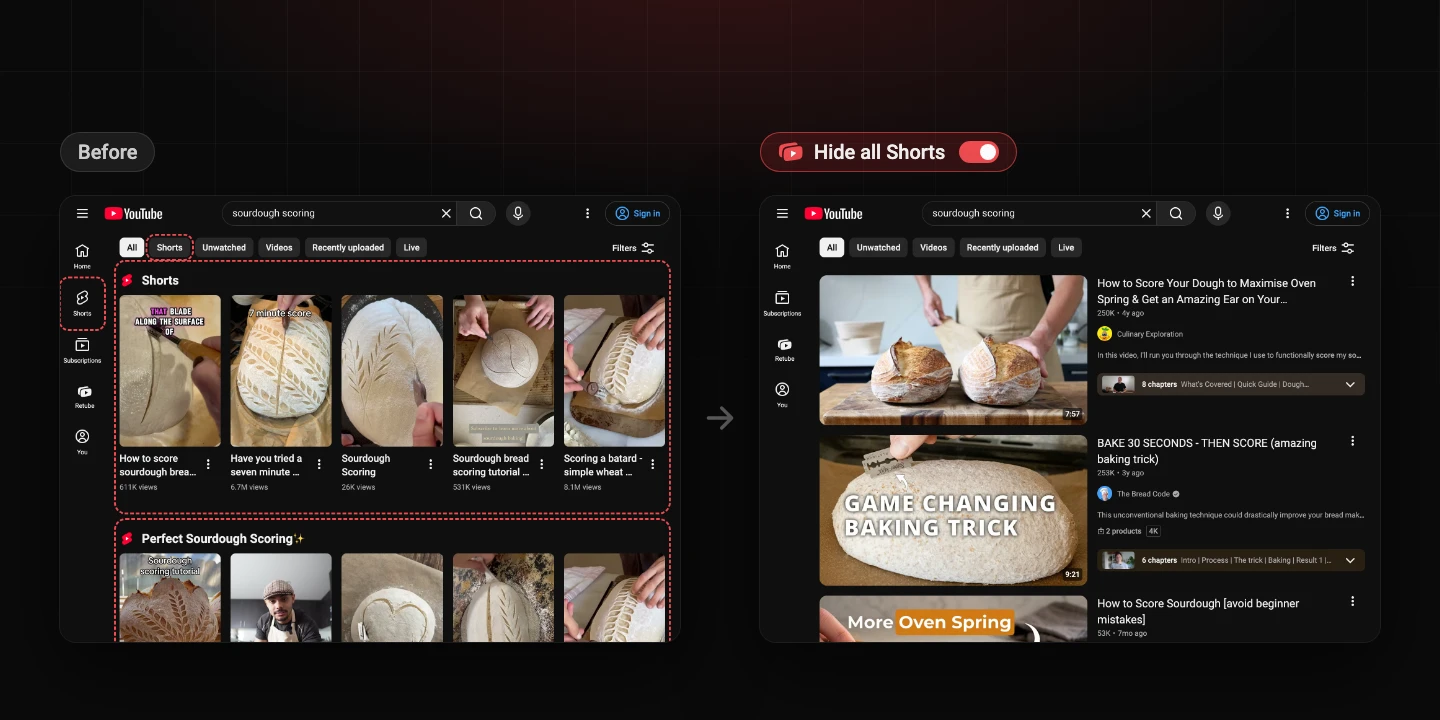
A new lever, Hide all Shorts, removes Shorts from YouTube. It sits in a new Shorts section of Levers, in the side panel and in the player’s Retube Levers list.
What it hides
- Shorts shelves on the home page, Subscriptions, search results, channel pages, and watch pages.
- Single Shorts among other videos, such as on hashtag pages, in search results, and in related videos.
- The Shorts entry in YouTube’s sidebar, expanded or collapsed.
- Shorts tabs on channel and hashtag pages, and the Shorts filter chip above search results.
- Links to Shorts, including those in descriptions and comments.
Tabs, chips, and the sidebar entry are recognized in every language YouTube offers. Spoiler-free doesn’t turn this lever on. The help guide lists it with the other levers.
Links to Shorts
While the lever is on, a link to a Short, such as one someone sends you, opens it on the regular watch page instead of the Shorts feed. A channel’s or hashtag’s Shorts page opens that channel or hashtag.
Your feeds
Your Retube feeds drop their Shorts tab and leave Shorts out of All while the lever is on. Turn it off and the tab comes back.
Other changes
- Hide auto-generated is now Hide auto-generated chapters, and Hide all is Hide all chapters, so each lever’s name stands on its own.
- What’s new shares a row with About Retube, Help & support, and Privacy policy at the bottom of the side panel.
- Retube’s buttons beside the player match the size, background, and hover highlight of YouTube’s own controls, full screen included.