Hide buttons on Shorts
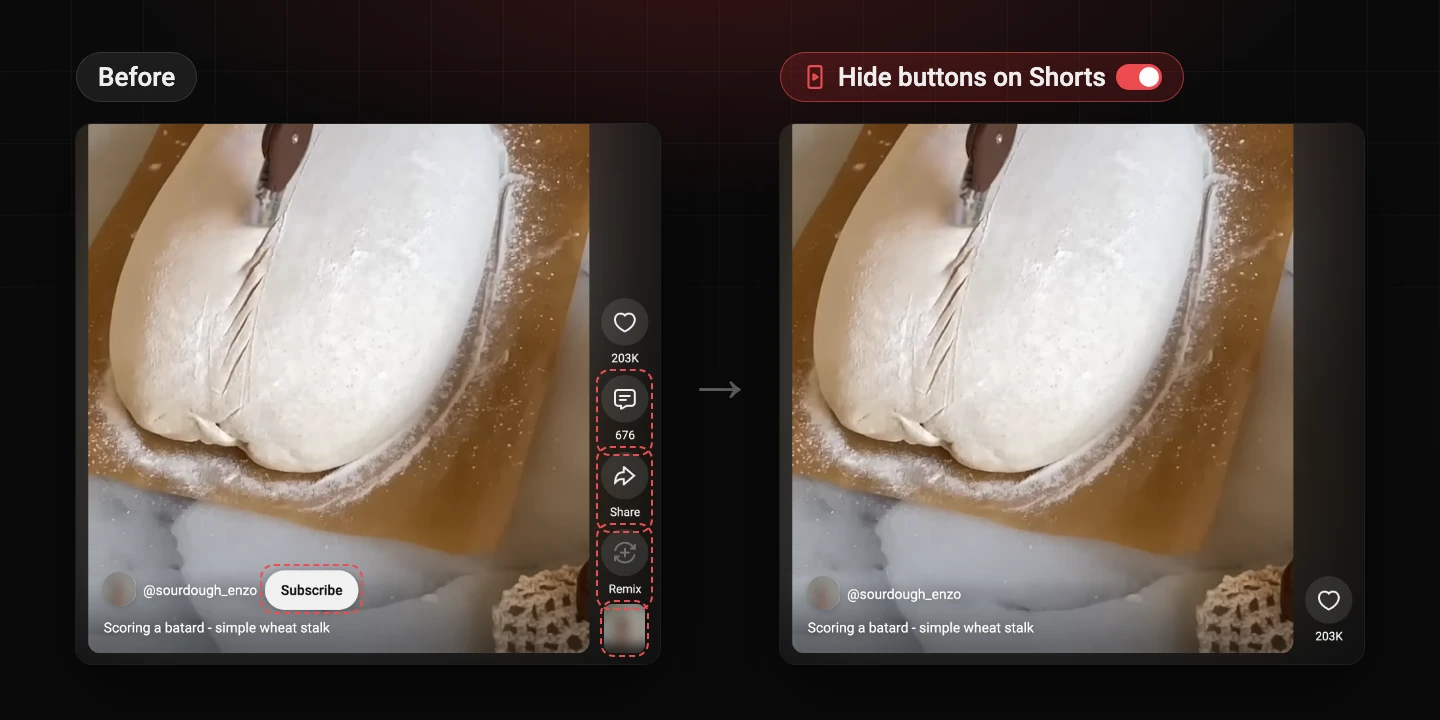
Ten new Shorts levers hide the buttons over and beside a Short. Turn off the ones you don’t use, and they stay off on every Short you swipe to. The help guide lists each Shorts lever and what it hides.
The buttons beside a Short
- Hide Comments removes the comments button, so a Short’s thread stays closed.
- Hide Sound removes the button that opens other Shorts using the same audio, and Hide Remix removes Remix.
- Hide Like, Hide Dislike and Hide Share remove those buttons, and Hide Subscribe removes Subscribe beside the channel name.
The buttons that stay keep their spacing, and every lever works in any language YouTube offers.
Player controls
Hide Play, Hide Mute and Hide More actions remove the play button, the mute button with its volume slider, and the three-dot menu with Not interested and Report. Pressing K or clicking the video still pauses, and M still mutes.
Hide all Shorts covers every new lever, since Shorts then open on the regular watch page.
YouTube tabs open during an update
YouTube tabs that were open when Retube updated now switch to the new version on their own. In Chrome and Edge, those tabs used to ignore lever changes and fail to load feeds until you reloaded them. In Firefox, they showed Retube’s sidebar section and feed twice. The page doesn’t reload, so a video that’s playing keeps playing.